
Android PCB ビューアー

PCBAtlas Android PCB ビューアー|公式 APK ダウンロード

PCBAtlas の公式 Android APK をダウンロード。スマートフォンやタブレットで KiCad、ODB++、IPC-2581、認識可能な Gerber/Drill パッケージをローカル表示。インストール方法と SHA-256 も確認できます。

APK は公式サイトのダウンロードゲートから配布され、検証ファイルはビルド元を確認できるよう公開されています。

Android PCB ビューアー

Android 端末で PCB データを表示、レビュー。

Android のスマートフォンやタブレットで、現場確認、リビジョン確認、製造に関する打ち合わせを行えます。
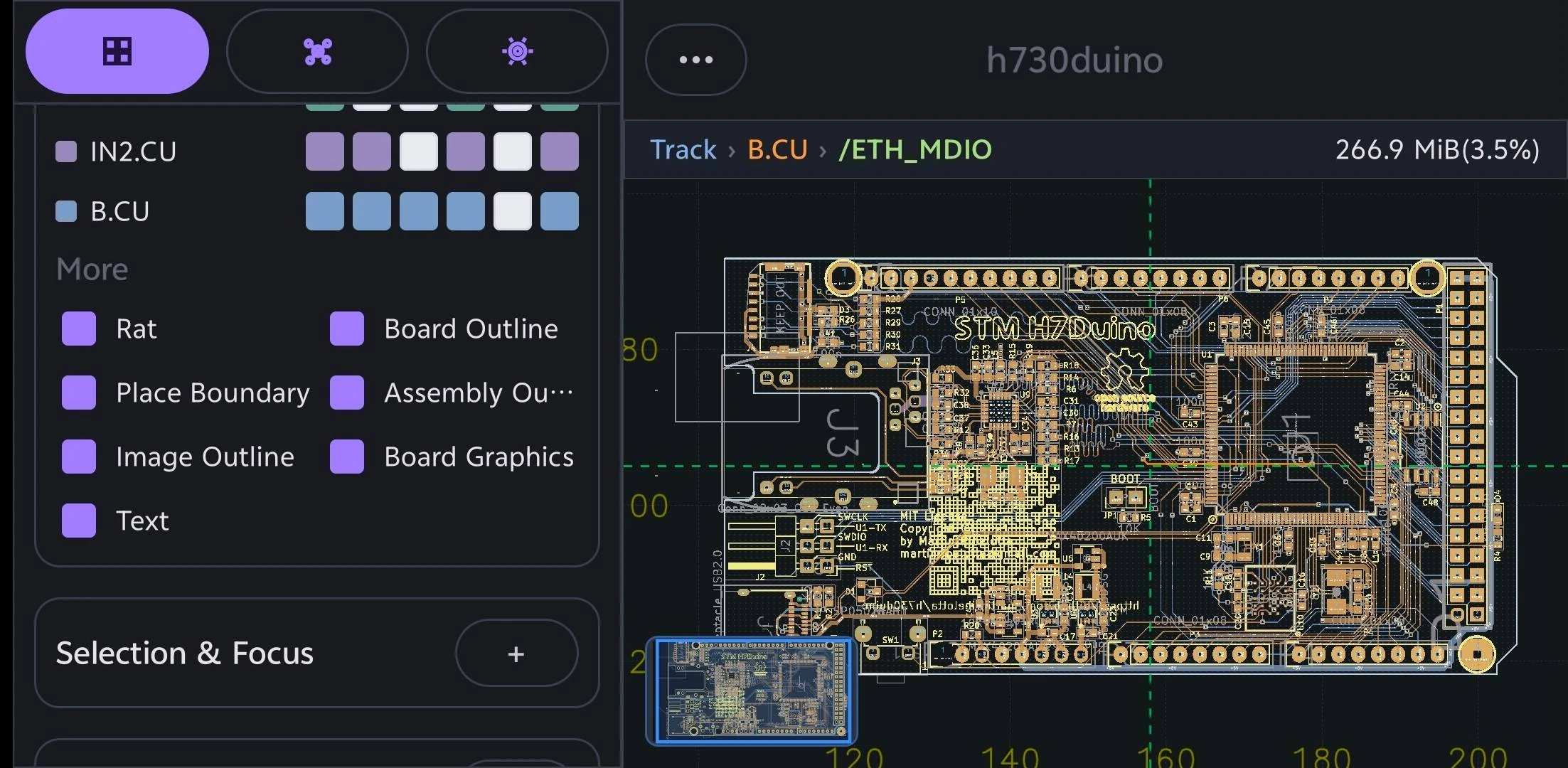
Android 向け PCB ビューア: Android 端末で PCB データを表示、レビュー。
実際の PCB データを対象に、iPhone、iPad、Mac、Android で滑らかなズーム、パン、ボックス選択、オブジェクト選択、素早い情報確認ができるよう設計されています。

モバイル表示を優先

Android 版は、エンジニアリングレビュー、現場連絡、製造チェック、問題説明のためにスマートフォンやタブレットで PCB データを開く人向けです。

設計側と製造側の形式

PCBAtlas の取り込み経路は KiCad、DSN、ODB++、IPC-2581 XML、認識済み製造パッケージフォルダをカバーします。

範囲を明確に

PCBAtlas は PCB レイアウトエディタではありません。表示、整理、検査、レビュー、引き渡しに向けた製品です。

デバイスと形式から PCB ビューアを探す

デバイスまたはファイル形式からガイドを選び、対応入力、レビュー機能、利用範囲を確認できます。

APK のインストール

  1. ダウンロードボタンをタップし、APK の完了を待ちます。
  2. ダウンロードした APK を開き、Android の案内に従います。
  3. 不明なアプリの許可を求められた場合は、使用中のブラウザだけに許可してください。

リリース履歴

Android の新機能

PCBAtlas Android の各リリースに含まれる主なユーザー向け変更です。リリースノートは英語で掲載しています。

1.2.6 (54)

  • Added native SI/PI analysis and radiation-task workflows with progress and cancellation.
  • Added explicit workspace view saving for camera and display settings, aligned with the iOS document workflow.
  • Improved PCB and schematic save recovery, source preservation and revision migration.
  • Reduced temporary memory during large KiCad imports and deferred unused 3D pipeline creation until needed.
  • Kept import progress visible until the complete first frame, including text, is presented.
  • Fixed revision-selection rollback and preserved library metadata when a requested source or revision is missing.
  • Improved schematic sheet navigation and migration-draft exit, and fixed design-graph resource release during teardown.
  • The official APK remains the fully unlocked Public Beta edition, with no billing or purchase flow.

1.2.5 (53)

  • Added 2D measurement, directional box selection and expanded Slide controls for tracks, vertices, vias and parallel routes.
  • Added native Design PCB saves with source preservation and recoverable editing drafts.
  • Unified application menus, buttons, checkboxes and dialogs, and improved long confirmation labels and scrolling reports.
  • Refined Gallery Add with a plus-only trigger, a prominent new-project action, bold import titles and localized supported-format guidance.
  • Aligned object opacity controls with iOS: Tracks defaults to 80%, Text and Zones to 15%, and sliders span 5–100%; valid saved settings are retained.
  • Fixed blank canvas flashes after Slide commits and kept resident text opacity consistent with fresh rendering when switching layers.
  • Improved Vulkan stroke batching and indexed geometry reuse, and refreshed Altium and IPC-2581 import compatibility.
  • The official APK remains the fully unlocked Public Beta edition, with no billing or purchase flow.

1.2.4 (52)

  • Added Allegro BRD design imports with source preservation in managed packages and clear format labels.
  • Preserved filled copper at cross-hatch intersections in Vulkan rendering and vector PDF exports.
  • Shared compact packet storage and reduced repeated label preparation work on large boards.
  • Cancelled retired 3D mesh and picking-index builds when closing, pausing, or replacing their viewer, and shortened model-parser cache lifetimes.
  • The official APK remains the fully unlocked Public Beta edition, with no billing or purchase flow.

1.2.3 (51)

  • Improved ODB++ rendering across zoom levels and reduced CAM import memory while preserving source geometry.
  • Released 3D renderer resources when closing the window and stopped repeated whole-board allocations during 2D selection.
  • Made pad selection more responsive and prepared PCB editing after the first frame, with cancellation when the document closes.
  • Made thumbnail regeneration reuse the displayed board and save only the updated cover.
  • Preserved solid KiCad board rectangles through import and native/KiCad saves, and corrected filled-decoration visibility when changing display controls.
  • Preserved Altium copper fills and layer identities, reused Allegro pad geometry, and fixed dynamic copper clearance-rule updates.
  • Removed the obsolete long-press menu for selected 2D objects.
  • The official APK remains the fully unlocked Public Beta edition, with no billing or purchase flow.

1.2.2 (50)

  • Replaced inactive-text dimming with Opaque active, restored Text opacity control, and kept generated net and pin labels visible at every zoom level.
  • Removed the duplicate Filled Shapes control; Zones now exclusively controls copper fills, with safe migration of existing appearance settings.
  • Refined appearance tabs, sliders, information panels, project navigation, and wide-screen 3D viewer layout.
  • Fixed clipped coordinate labels at the left screen edge and added Release/Debug build configuration to Settings > Version.
  • Refreshed all 12 app languages and corrected remaining untranslated appearance, viewer and diagnostic labels.
  • The official APK remains the fully unlocked Public Beta edition, with no billing or purchase flow.

1.2.2 (49)

  • Removed oversized generated copper-plane network names such as P1V8 when changing the active layer; static generated labels now follow iOS track and pad/via sources.
  • Preserved copper fill rendering, network metadata and picking, as well as normal track and pad/via labels.
  • The official APK remains the fully unlocked Public Beta edition, with no billing or purchase flow.

1.2.2 (48)

  • Updated resident text focus and label competition in the first frame after changing the active layer, preventing stale labels from flashing over newly promoted geometry.
  • Kept camera-only text planning deferred and preserved primary GPU geometry during active-layer changes.
  • The official APK remains the fully unlocked Public Beta edition, with no billing or purchase flow.

1.2.2 (47)

  • Used compact square disclosure buttons and clearer chevrons in EditPanel headers.
  • Updated the bundled BluePhil board to the current KiCad 10 seed.
  • Reduced 3D picking memory by sharing immutable source meshes with picking indexes.
  • Aligned source PCB text with layer drawing order and reused geometry when switching the active layer.
  • Faded generated labels at small screen sizes while keeping selected and highlighted labels readable.
  • Enabled dim inactive text by default at 15% opacity, preserved explicit saved settings, and placed the compact control beside text visibility.
  • The official APK remains the fully unlocked Public Beta edition, with no billing or purchase flow.

1.2.2 (46)

  • Fixed several PCB and schematic import failures, including migrated projects that could not reopen.
  • Preserved small contour, arc, and wide round-stroke geometry across supported board formats.
  • Gave EditPanel section headers a distinct background and joined the Layers and Objects tabs into one seamless control.
  • The official APK remains the fully unlocked Public Beta edition, with no billing or purchase flow.

1.2.1 (45)

  • Made the first PCB pan faster by reusing renderer resources when the viewing surface changes.
  • Reduced memory use when importing and navigating large boards.
  • Kept the loading state until the first complete PCB frame is ready.
  • The official APK remains the fully unlocked Public Beta edition, with no billing or purchase flow.

1.2.1 (44)

  • Kept schematic text visible at every zoom level.
  • Prepared PCB and schematic views together when opening projects, avoiding a blank PCB first frame.
  • Prevented unnecessary PCB redraws when cross-probing nearby shapes.
  • Restored missing silkscreen graphics and made silkscreen fully opaque.
  • Replaced the Text opacity slider with Dim inactive text: active-layer text stays opaque and inactive-layer text uses 30% opacity when enabled.
  • Automatically upgraded supported older KiCad files during import, including the 20240706 format, while preserving original files and saved copper fills.
  • Fixed an IPC-2581 manufacturing-export crash caused by stale supplemental pad references.
  • The official APK remains the fully unlocked Public Beta edition, with no billing or purchase flow.

1.2.0 (43)

  • Improved first 3D preparation, component picking and selection redraws on large boards.
  • Simplified 3D component controls while preserving visibility preferences from earlier versions.
  • Added authored Text visibility and opacity controls to Objects, with matching screen and vector PDF output.
  • Reused resident geometry and text layouts for appearance changes.
  • Removed the publicBeta banner from Gallery.
  • Fixed schematic pin-reference and import diagnostics regressions.
  • The official APK remains the fully unlocked Public Beta edition, with no billing or purchase flow.

1.2.0 (42)

  • Reduced memory usage and GPU work when opening large boards in 3D.
  • Enabled responsive 3D component picking with independent selection and source information.
  • Kept narrow-screen 3D canvases square and increased space for scrollable controls.
  • Objects with opacity controls now default to 50%, while retaining explicitly saved values.
  • Added consistent button outlines, including Layers/Objects controls and confirmation actions.
  • Replaced the Gallery Empty Project button with a Check for Updates action on the right.
  • The official APK remains the fully unlocked Public Beta edition, with no billing or purchase flow.

1.2.0 (41)

  • Reduced the 3D window header height while retaining the shared 32 dp Close button.
  • Aligned 3D orientation and export actions with iOS icons and added borders to text actions and projection choices.
  • The official APK remains the fully unlocked Public Beta edition, with no billing or purchase flow.

1.2.0 (40)

  • Unified buttons into two sizes: 42 dp for standard actions and 32 dp for panel actions.
  • Replaced compact controls with panel-sized controls, including narrow-panel Close/expand and 3D Close buttons.
  • The official APK remains the fully unlocked Public Beta edition, with no billing or purchase flow.

1.2.0 (39)

  • Enlarged PCB copper-category checkboxes and centered layer labels within their touch targets.
  • Added larger, spaced Close and expand buttons to narrow-screen panels and matched the 3D Close button.
  • The official APK remains the fully unlocked Public Beta edition, with no billing or purchase flow.

1.2.0 (38)

  • Retained the PCB appearance, CAD text, vector PDF export and import improvements from build 37.
  • Fixed release packaging while preserving DSN rule import and export behavior.
  • Improved DRC evidence for supported boards while preserving explicit rejection of unsupported project rules.
  • Some board-file and manufacturing exports remain unavailable when their design rules cannot be preserved by the exporter.
  • The official APK remains the fully unlocked Public Beta edition, with no billing or purchase flow.

1.2.0 (37)

  • Redesigned PCB appearance controls with Layers and Objects tabs, per-document colors and opacity, and independent copper-category visibility.
  • Improved active-layer emphasis, drilled-pad rendering, CAD-stroke text and vector PDF exports.
  • Updated bundled board sources for KiCad 10 and fixed custom-pad thermal-angle imports.
  • Improved folder and project-package import recovery and document lifecycle reliability.
  • Some board-file and manufacturing exports remain unavailable when their design rules cannot be preserved by the exporter.
  • The official APK remains the fully unlocked Public Beta edition, with no billing or purchase flow.

1.2.0 (36)

  • Added signed Public Beta APK releases from version tags, with downloadable SHA-256 and source/signing manifests.
  • Retained the viewer, schematic, and import improvements from build 35.

1.2.0 (35)

  • Improved legacy KiCad copper-fill import performance and expanded automatic 3D package coverage.
  • Aligned 2D/3D navigation, Info previews, selection, and capture behavior with iOS.
  • Added schematic editing, symbol placement, history, save and reopen workflows, and project cross-probing.
  • Fixed schematic cross-probing that could leave the previous sheet on the canvas.
  • Improved viewer lifecycle recovery and file, folder, and project-package import handling.
  • The official APK remains the fully unlocked Public Beta edition, with no billing or purchase flow.

1.2.0 (34)

  • Fixed PCB and schematic cross-probing for symbols in repeated sheet instances and multi-unit components with embedded library copies.
  • Kept zooming responsive during selection queries and prevented status-bar wrapping from resizing the canvas.
  • Added confirmation before returning to Gallery and simplified schematic search controls.
  • Fixed a native-library initialization crash.
  • The official APK remains the fully unlocked Public Beta edition, with no store purchase required.

1.2.0 (33)

  • Refined floating workspace panels, picked-object information, settings controls, and 3D orientation tools to align with iOS.
  • Improved initial canvas sizing and retained the 2D view while opening the 3D panel.
  • Fixed AI panel gestures passing through to the PCB canvas.
  • Fixed repeated redraws while idle and unwanted Fit All camera changes after zooming.
  • The official APK is the fully unlocked Public Beta edition, with no store purchase required.

1.1.4 (32)

  • Added the lifetime Plus purchase with verified store ownership, purchase restoration, and offline access.
  • The store edition now requires purchase for export, sharing, and unlimited board workspaces; the separate Public Beta edition remains fully unlocked.
  • Aligned PNG/PDF export access and the free workspace quota banner with iOS.
  • Fixed import progress restarting after completion and added empty-board and compressed IPC-2581 regression coverage.

1.1.4 (31)

  • Android now has two editions: fully unlocked Public Beta, and a store edition with an Unlock button and detailed purchase page.
  • The store edition is currently fully unlocked for free, while keeping real purchase and restore available. Its purchase page explains that pricing may change in future versions.

1.1.4 (30)

  • This version is temporarily free with all Plus features unlocked. The purchase information page remains available and explains that pricing rules may change in future versions.

1.1.4 (29)

  • Fixed PCB canvases that could remain blank when opening a project in split view on physical Android devices; board content now appears without a pan gesture.

1.1.4 (28)

  • Fixed schematic MiniViewer thumbnails so the current sheet is framed correctly instead of appearing only in the upper-right corner.
  • Fit the complete schematic sheet when opening a project, with correct centering and margins in portrait and landscape.
  • Fixed project PCB canvases that stayed blank until the first pan gesture.
  • Corrected MiniViewer sizes on high-density displays and aligned thumbnail framing with the current iOS behavior.

1.1.4 (27)

  • Added configurable AI providers with custom endpoints, API formats, model selection, connection testing, and independently saved credentials.
  • Refined PCB and schematic canvas rendering, selection highlights, vector exports, and compact split-view controls to match current iOS behavior.
  • Improved stability when rotating the device, switching documents, closing viewers, or cancelling AI and background work.
  • Made library saves, revision changes, duplication, deletion, and undo/redo recover safely from failed writes, while preserving exact undo history for large schematic edits.
  • Protected existing projects during failed preset upgrades and package copies, and made revision report backup, restore, and deletion failures explicit.
  • Kept ordinary settings available when AI provider configuration needs repair and added clearer recovery feedback for saved changes that still need synchronization.

1.1.3 (26)

  • Refined the Gallery with a compact New menu, an iOS-aligned email bug-report action, and concise Public Beta and developer build labels.
  • Unified filled, outlined, text, and icon buttons across Gallery, Viewer, Workbench, Data, AI, and Settings with a compact visual style, including a matching Back to Gallery control.
  • Standardized PCBAtlas naming and synchronized the new Gallery and feedback wording across all supported Android languages.

1.1.2 (25)

  • Added iOS-aligned split PCB and schematic project viewing with responsive two-way cross-probing, including component and pin jumps, synchronized highlights, and selection clearing on empty or unrelated taps.
  • Improved schematic interaction with larger pick targets, immediate selection feedback, world-scaled labels, consistent multi-pin highlighting, and more contextual navigation framing around focused items.
  • Stabilized project opening and background preparation with visible status feedback, retained viewer surfaces, document-scoped sheet and workspace state, and safe handoff when project sessions are rebuilt.
  • Fixed slow or failed PCB and schematic jumps and lifecycle crashes caused by concurrent native session release, while preserving fast picking on large projects.
  • Updated project and import behavior to the current iOS contract, including packaged preset libraries, import recovery disclosure, and more reliable KiCad, IPC-2581, DSN, and ODB++ workflows.

1.1.1 (24)

  • Corrected oversized drilled holes in ODB++ boards by preserving the diameter declared by implicit drill features, including dense via-in-pad arrays.

1.1.1 (23)

  • Added iOS-aligned in-place KiCad PCB editing with Slide, via movement, track-width and removal actions, undo, and direct saving to the current library revision.
  • Redesigned the 2D Viewer around the floating toolbar and top mini viewer, with an immediate blue Slide preview and one-checkmark commit flow.
  • Refined object information and Selection Filter panels with compact sizing, clearer guidance, direct candidate access, and copy actions.
  • Fixed stale selection and provenance failures that could reject Trace or Segment edits or crash during Slide acceptance.
  • Marked unsaved documents with an asterisk and preserved existing Gallery thumbnails unchanged when saving edits.

1.1.1 (22)

  • Improved Import Folder reliability for older KiCad projects, including stale schematic references, case-mismatched model paths, and missing optional 3D assets that no longer block 2D opening.
  • Accelerated large project-folder staging and managed-source persistence, with demanding CIAA and VME projects completing within the 30-second physical-device acceptance target.

1.1.1 (21)

  • Improved managed DRC with on-demand execution, persisted results, startup recovery, and clearer localized status.
  • Accelerated large-board opening and first interaction, including CIAA, while preserving DRC state and reusing pick data as the canvas moves.
  • Refined 2D Vulkan rendering to follow current iOS visibility, density, tiling, and CAD-stroke text behavior for clearer labels and steadier zoom and pan presentation.
  • Corrected selection highlighting so pads and vias retain holes and text, while selected traces use the iOS orange blend without covering labels.

1.1.0 (20)

  • Added the iOS-aligned live DRC workflow with progress reporting, display controls, and Vulkan-rendered markers that remain visible while panning or zooming the board.
  • Added managed Board Diff and Project Overview workflows, including saved comparisons, stable exports, and revision-aware project information.
  • Improved CIAA and other large-board imports with faster native processing, coalesced progress delivery, an elapsed-time indicator, and immediate viewer interaction while background preparation continues.
  • Corrected filled-area rendering, segment-specific selection emphasis, default layer visibility, and PCB-only workspace navigation so standalone boards no longer expose an empty Project page.
  • Updated the bundled preset library and golden import coverage, including current KiCad project packages and the H730 ODB++ archive.
  • Aligned viewer background status messages and related terminology across all supported Android languages.

1.0.9 (19)

  • Fixed DSN export for large boards, including the `video` board, so export completes reliably instead of stalling during copper-plane processing.
  • Preserved adjacent KiCad project files when importing and reopening `.kicad_pcb` boards, keeping project-backed exports and shares intact.
  • Fixed the 3D viewer so the green physical board body remains visible independently of copper-layer visibility filters.

1.0.9 (18)

  • Aligned the board library and native bridge with the current iOS PcbCore data contracts, including validated KiCad project packages that can be reopened, reimported, and shared as portable ZIPs.
  • Updated bundled preset handling to the iOS preset-library v2 archive and directory format with package integrity checks, while improving board revisions and project import/export metadata.
  • Kept Viewer selection and compact 2D/3D scene data synchronized with edited track and via topology, and aligned schematic Workbench and manufacturing export bridge behavior with the current engine.
  • Removed the obsolete SES base-revision import action from the Gallery.

1.0.8 (17)

  • Fixed an issue that could prevent the 3D viewer from opening.
  • Improved the reliability of board edits, previews, and undo and redo.

1.0.7 (16)

  • Improved first-time project and archive imports, including reliable ZIP-based ODB++ loading and stable first-frame display without a temporary black canvas.
  • Refined the Gallery to match PCBAtlas on iOS with a true Empty Project action, compact project titles, complete format badges, better-framed thumbnails, and update checking in the top toolbar.
  • Fixed 2D line-width scaling and improved canvas lifecycle, camera restoration, gesture handling, and thumbnail capture.
  • Improved the 3D viewer with an iOS-style view cube, board-centered rotation, and aligned pan and zoom gestures.
  • Aligned Viewer, schematic Workbench, Data, and AI page chrome across portrait and landscape while removing desktop-only menu actions from compact layouts.
  • Added version and build-time details in Settings plus a prefilled “Find a bug?” email action, with matching localized text across supported languages.

1.0.6 (15)

  • Added the in-app Device Test flow for repeatable 2D, 3D, Workbench, Data, display, selection, and export checks, with a shareable report.
  • Added converted board-file exports for DSN, KiCad PCB, and PCB Binary alongside the manufacturing export formats.

1.0.6 (14)

  • Fixed a release-build failure that prevented imported PCB cases from opening.
  • Added Geometry Review and assembly checking workflows, including Workbench integration and shareable review package export.
  • Expanded board and project import support to match PCBAtlas on iOS, including KiCad project-folder and archive inputs with stronger malformed-file protection.
  • Improved managed board revisions so revisions reopen and select reliably, unchanged revisions are ignored, and thumbnails recover correctly.
  • Improved viewer reliability across fresh surfaces, device rotation, prewarming, selection, and display filters.
  • Moved net-label visibility into Settings, with changes applied live in the viewer.
  • Improved 3D diagnostics and revision recovery.

1.0.5 (12)

  • Improved Settings search to include more settings, page links, and action buttons.
  • Added search support for the current interface language across all supported locales.
  • Reduced the Settings search field height to match the Highlight & Objects panel.
  • Fixed an ODB++ board display issue.
  • Clear temporary highlights when returning to the library so old selections do not appear when reopening a board.

1.0.4 (11)

  • Improved 2D viewer rendering, status information, and interactions.
  • Improved import and viewing performance for large boards and ODB++ packages.
  • Strengthened website APK packaging, signing, and security audits.
  • Removed store billing runtime components from website builds.

Earlier releases

  • Continued improvements to PCB, schematic, 3D, Workbench, Data, AI, and manufacturing export workflows.
  • Continued alignment with the iOS and macOS PCBAtlas interface, terminology, and behavior.