Переглядач PCB для Android

PCBAtlas: переглядач PCB для Android — офіційний APK

Завантажте офіційний APK PCBAtlas для Android. Переглядайте KiCad, ODB++, IPC-2581 і розпізнані пакети Gerber/Drill локально на телефоні чи планшеті.

APK видається через шлюз завантаження сайту; файли перевірки відкриті, щоб можна було перевірити джерело збірки.

Переглядач PCB для Android

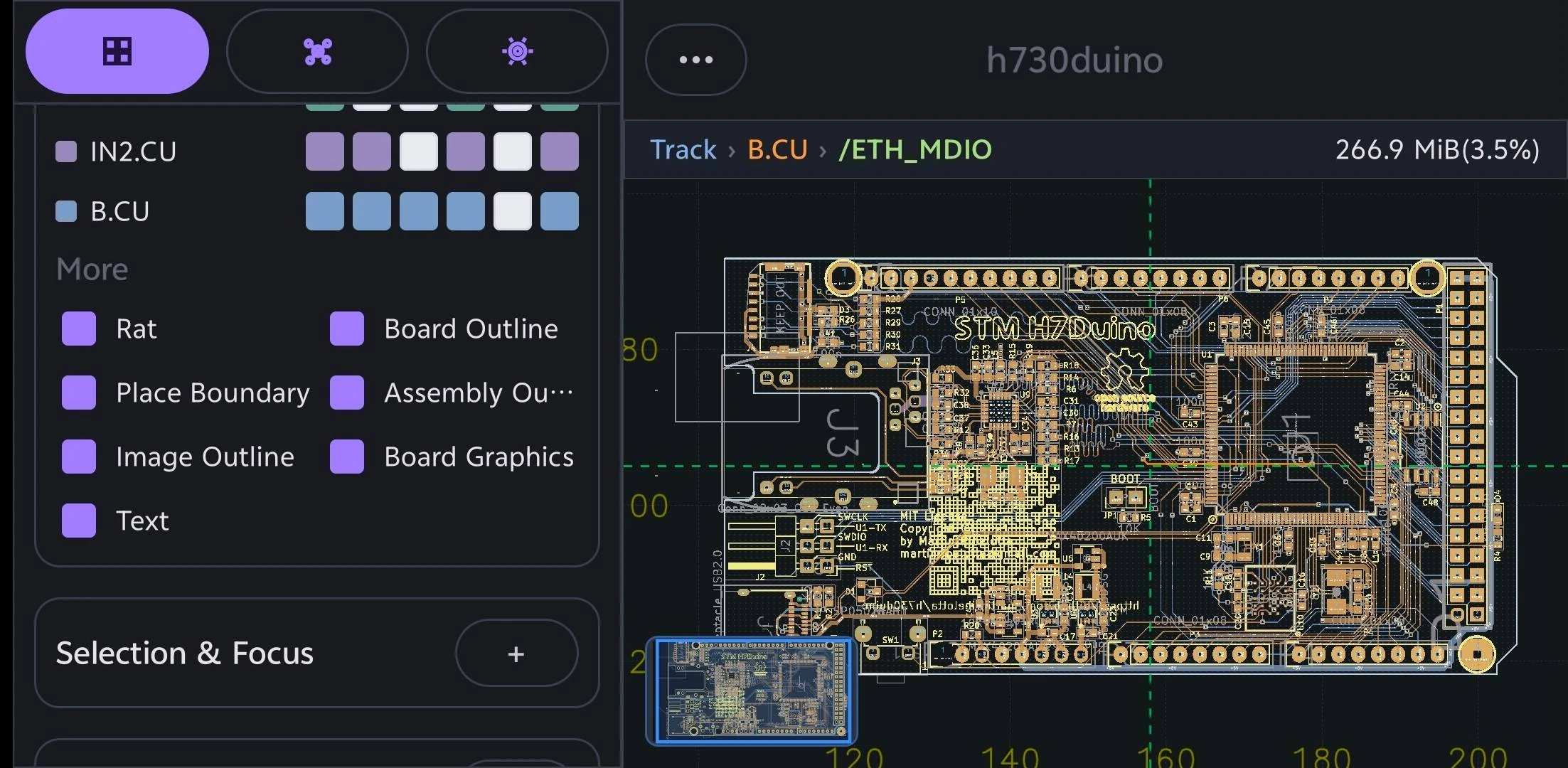
Переглядайте дані PCB на пристроях Android.

Використовуйте телефон або планшет Android для виїзних перевірок, підтвердження ревізій і виробничих обговорень.

Переглядач PCB для Android: Переглядайте дані PCB на пристроях Android.
Плавне масштабування, панорамування, вибір прямокутником, вибір об’єктів і швидкий пошук інформації допомагають працювати з реальними даними PCB на iPhone, iPad, Mac або Android.

Мобільний перегляд спочатку

Випуск Android призначений для людей, яким потрібно відкрити дані PCB на телефоні чи планшеті для технічної перевірки, спілкування на місцях, виробничих перевірок і обговорення проблеми.

Формати на стороні дизайну та на стороні виробництва

Шляхи імпорту PCBAtlas охоплюють KiCad, DSN, ODB++, IPC-2581 XML і розпізнані папки виробничих пакетів.

Чіткі межі

PCBAtlas не є редактором макета PCB. Він розміщений для перегляду, організації, перевірки, огляду та доставки.

Знайдіть засіб перегляду PCB за пристроєм і форматом

Оберіть посібник за пристроєм або форматом файлу, щоб побачити підтримувані джерела, можливості перевірки та межі використання.

Установлення APK

  1. Натисніть кнопку завантаження та дочекайтеся APK.
  2. Відкрийте завантажений APK і виконайте підказки Android.
  3. Якщо Android запитує дозвіл на невідомі застосунки, дозвольте його лише для поточного браузера.

Історія випусків

Що нового в Android

Важливі видимі для користувача зміни в кожному випуску PCBAtlas Android. Нотатки до випуску наведено англійською.

1.2.6 (54)

  • Added native SI/PI analysis and radiation-task workflows with progress and cancellation.
  • Added explicit workspace view saving for camera and display settings, aligned with the iOS document workflow.
  • Improved PCB and schematic save recovery, source preservation and revision migration.
  • Reduced temporary memory during large KiCad imports and deferred unused 3D pipeline creation until needed.
  • Kept import progress visible until the complete first frame, including text, is presented.
  • Fixed revision-selection rollback and preserved library metadata when a requested source or revision is missing.
  • Improved schematic sheet navigation and migration-draft exit, and fixed design-graph resource release during teardown.
  • The official APK remains the fully unlocked Public Beta edition, with no billing or purchase flow.

1.2.5 (53)

  • Added 2D measurement, directional box selection and expanded Slide controls for tracks, vertices, vias and parallel routes.
  • Added native Design PCB saves with source preservation and recoverable editing drafts.
  • Unified application menus, buttons, checkboxes and dialogs, and improved long confirmation labels and scrolling reports.
  • Refined Gallery Add with a plus-only trigger, a prominent new-project action, bold import titles and localized supported-format guidance.
  • Aligned object opacity controls with iOS: Tracks defaults to 80%, Text and Zones to 15%, and sliders span 5–100%; valid saved settings are retained.
  • Fixed blank canvas flashes after Slide commits and kept resident text opacity consistent with fresh rendering when switching layers.
  • Improved Vulkan stroke batching and indexed geometry reuse, and refreshed Altium and IPC-2581 import compatibility.
  • The official APK remains the fully unlocked Public Beta edition, with no billing or purchase flow.

1.2.4 (52)

  • Added Allegro BRD design imports with source preservation in managed packages and clear format labels.
  • Preserved filled copper at cross-hatch intersections in Vulkan rendering and vector PDF exports.
  • Shared compact packet storage and reduced repeated label preparation work on large boards.
  • Cancelled retired 3D mesh and picking-index builds when closing, pausing, or replacing their viewer, and shortened model-parser cache lifetimes.
  • The official APK remains the fully unlocked Public Beta edition, with no billing or purchase flow.

1.2.3 (51)

  • Improved ODB++ rendering across zoom levels and reduced CAM import memory while preserving source geometry.
  • Released 3D renderer resources when closing the window and stopped repeated whole-board allocations during 2D selection.
  • Made pad selection more responsive and prepared PCB editing after the first frame, with cancellation when the document closes.
  • Made thumbnail regeneration reuse the displayed board and save only the updated cover.
  • Preserved solid KiCad board rectangles through import and native/KiCad saves, and corrected filled-decoration visibility when changing display controls.
  • Preserved Altium copper fills and layer identities, reused Allegro pad geometry, and fixed dynamic copper clearance-rule updates.
  • Removed the obsolete long-press menu for selected 2D objects.
  • The official APK remains the fully unlocked Public Beta edition, with no billing or purchase flow.

1.2.2 (50)

  • Replaced inactive-text dimming with Opaque active, restored Text opacity control, and kept generated net and pin labels visible at every zoom level.
  • Removed the duplicate Filled Shapes control; Zones now exclusively controls copper fills, with safe migration of existing appearance settings.
  • Refined appearance tabs, sliders, information panels, project navigation, and wide-screen 3D viewer layout.
  • Fixed clipped coordinate labels at the left screen edge and added Release/Debug build configuration to Settings > Version.
  • Refreshed all 12 app languages and corrected remaining untranslated appearance, viewer and diagnostic labels.
  • The official APK remains the fully unlocked Public Beta edition, with no billing or purchase flow.

1.2.2 (49)

  • Removed oversized generated copper-plane network names such as P1V8 when changing the active layer; static generated labels now follow iOS track and pad/via sources.
  • Preserved copper fill rendering, network metadata and picking, as well as normal track and pad/via labels.
  • The official APK remains the fully unlocked Public Beta edition, with no billing or purchase flow.

1.2.2 (48)

  • Updated resident text focus and label competition in the first frame after changing the active layer, preventing stale labels from flashing over newly promoted geometry.
  • Kept camera-only text planning deferred and preserved primary GPU geometry during active-layer changes.
  • The official APK remains the fully unlocked Public Beta edition, with no billing or purchase flow.

1.2.2 (47)

  • Used compact square disclosure buttons and clearer chevrons in EditPanel headers.
  • Updated the bundled BluePhil board to the current KiCad 10 seed.
  • Reduced 3D picking memory by sharing immutable source meshes with picking indexes.
  • Aligned source PCB text with layer drawing order and reused geometry when switching the active layer.
  • Faded generated labels at small screen sizes while keeping selected and highlighted labels readable.
  • Enabled dim inactive text by default at 15% opacity, preserved explicit saved settings, and placed the compact control beside text visibility.
  • The official APK remains the fully unlocked Public Beta edition, with no billing or purchase flow.

1.2.2 (46)

  • Fixed several PCB and schematic import failures, including migrated projects that could not reopen.
  • Preserved small contour, arc, and wide round-stroke geometry across supported board formats.
  • Gave EditPanel section headers a distinct background and joined the Layers and Objects tabs into one seamless control.
  • The official APK remains the fully unlocked Public Beta edition, with no billing or purchase flow.

1.2.1 (45)

  • Made the first PCB pan faster by reusing renderer resources when the viewing surface changes.
  • Reduced memory use when importing and navigating large boards.
  • Kept the loading state until the first complete PCB frame is ready.
  • The official APK remains the fully unlocked Public Beta edition, with no billing or purchase flow.

1.2.1 (44)

  • Kept schematic text visible at every zoom level.
  • Prepared PCB and schematic views together when opening projects, avoiding a blank PCB first frame.
  • Prevented unnecessary PCB redraws when cross-probing nearby shapes.
  • Restored missing silkscreen graphics and made silkscreen fully opaque.
  • Replaced the Text opacity slider with Dim inactive text: active-layer text stays opaque and inactive-layer text uses 30% opacity when enabled.
  • Automatically upgraded supported older KiCad files during import, including the 20240706 format, while preserving original files and saved copper fills.
  • Fixed an IPC-2581 manufacturing-export crash caused by stale supplemental pad references.
  • The official APK remains the fully unlocked Public Beta edition, with no billing or purchase flow.

1.2.0 (43)

  • Improved first 3D preparation, component picking and selection redraws on large boards.
  • Simplified 3D component controls while preserving visibility preferences from earlier versions.
  • Added authored Text visibility and opacity controls to Objects, with matching screen and vector PDF output.
  • Reused resident geometry and text layouts for appearance changes.
  • Removed the publicBeta banner from Gallery.
  • Fixed schematic pin-reference and import diagnostics regressions.
  • The official APK remains the fully unlocked Public Beta edition, with no billing or purchase flow.

1.2.0 (42)

  • Reduced memory usage and GPU work when opening large boards in 3D.
  • Enabled responsive 3D component picking with independent selection and source information.
  • Kept narrow-screen 3D canvases square and increased space for scrollable controls.
  • Objects with opacity controls now default to 50%, while retaining explicitly saved values.
  • Added consistent button outlines, including Layers/Objects controls and confirmation actions.
  • Replaced the Gallery Empty Project button with a Check for Updates action on the right.
  • The official APK remains the fully unlocked Public Beta edition, with no billing or purchase flow.

1.2.0 (41)

  • Reduced the 3D window header height while retaining the shared 32 dp Close button.
  • Aligned 3D orientation and export actions with iOS icons and added borders to text actions and projection choices.
  • The official APK remains the fully unlocked Public Beta edition, with no billing or purchase flow.

1.2.0 (40)

  • Unified buttons into two sizes: 42 dp for standard actions and 32 dp for panel actions.
  • Replaced compact controls with panel-sized controls, including narrow-panel Close/expand and 3D Close buttons.
  • The official APK remains the fully unlocked Public Beta edition, with no billing or purchase flow.

1.2.0 (39)

  • Enlarged PCB copper-category checkboxes and centered layer labels within their touch targets.
  • Added larger, spaced Close and expand buttons to narrow-screen panels and matched the 3D Close button.
  • The official APK remains the fully unlocked Public Beta edition, with no billing or purchase flow.

1.2.0 (38)

  • Retained the PCB appearance, CAD text, vector PDF export and import improvements from build 37.
  • Fixed release packaging while preserving DSN rule import and export behavior.
  • Improved DRC evidence for supported boards while preserving explicit rejection of unsupported project rules.
  • Some board-file and manufacturing exports remain unavailable when their design rules cannot be preserved by the exporter.
  • The official APK remains the fully unlocked Public Beta edition, with no billing or purchase flow.

1.2.0 (37)

  • Redesigned PCB appearance controls with Layers and Objects tabs, per-document colors and opacity, and independent copper-category visibility.
  • Improved active-layer emphasis, drilled-pad rendering, CAD-stroke text and vector PDF exports.
  • Updated bundled board sources for KiCad 10 and fixed custom-pad thermal-angle imports.
  • Improved folder and project-package import recovery and document lifecycle reliability.
  • Some board-file and manufacturing exports remain unavailable when their design rules cannot be preserved by the exporter.
  • The official APK remains the fully unlocked Public Beta edition, with no billing or purchase flow.

1.2.0 (36)

  • Added signed Public Beta APK releases from version tags, with downloadable SHA-256 and source/signing manifests.
  • Retained the viewer, schematic, and import improvements from build 35.

1.2.0 (35)

  • Improved legacy KiCad copper-fill import performance and expanded automatic 3D package coverage.
  • Aligned 2D/3D navigation, Info previews, selection, and capture behavior with iOS.
  • Added schematic editing, symbol placement, history, save and reopen workflows, and project cross-probing.
  • Fixed schematic cross-probing that could leave the previous sheet on the canvas.
  • Improved viewer lifecycle recovery and file, folder, and project-package import handling.
  • The official APK remains the fully unlocked Public Beta edition, with no billing or purchase flow.

1.2.0 (34)

  • Fixed PCB and schematic cross-probing for symbols in repeated sheet instances and multi-unit components with embedded library copies.
  • Kept zooming responsive during selection queries and prevented status-bar wrapping from resizing the canvas.
  • Added confirmation before returning to Gallery and simplified schematic search controls.
  • Fixed a native-library initialization crash.
  • The official APK remains the fully unlocked Public Beta edition, with no store purchase required.

1.2.0 (33)

  • Refined floating workspace panels, picked-object information, settings controls, and 3D orientation tools to align with iOS.
  • Improved initial canvas sizing and retained the 2D view while opening the 3D panel.
  • Fixed AI panel gestures passing through to the PCB canvas.
  • Fixed repeated redraws while idle and unwanted Fit All camera changes after zooming.
  • The official APK is the fully unlocked Public Beta edition, with no store purchase required.

1.1.4 (32)

  • Added the lifetime Plus purchase with verified store ownership, purchase restoration, and offline access.
  • The store edition now requires purchase for export, sharing, and unlimited board workspaces; the separate Public Beta edition remains fully unlocked.
  • Aligned PNG/PDF export access and the free workspace quota banner with iOS.
  • Fixed import progress restarting after completion and added empty-board and compressed IPC-2581 regression coverage.

1.1.4 (31)

  • Android now has two editions: fully unlocked Public Beta, and a store edition with an Unlock button and detailed purchase page.
  • The store edition is currently fully unlocked for free, while keeping real purchase and restore available. Its purchase page explains that pricing may change in future versions.

1.1.4 (30)

  • This version is temporarily free with all Plus features unlocked. The purchase information page remains available and explains that pricing rules may change in future versions.

1.1.4 (29)

  • Fixed PCB canvases that could remain blank when opening a project in split view on physical Android devices; board content now appears without a pan gesture.

1.1.4 (28)

  • Fixed schematic MiniViewer thumbnails so the current sheet is framed correctly instead of appearing only in the upper-right corner.
  • Fit the complete schematic sheet when opening a project, with correct centering and margins in portrait and landscape.
  • Fixed project PCB canvases that stayed blank until the first pan gesture.
  • Corrected MiniViewer sizes on high-density displays and aligned thumbnail framing with the current iOS behavior.

1.1.4 (27)

  • Added configurable AI providers with custom endpoints, API formats, model selection, connection testing, and independently saved credentials.
  • Refined PCB and schematic canvas rendering, selection highlights, vector exports, and compact split-view controls to match current iOS behavior.
  • Improved stability when rotating the device, switching documents, closing viewers, or cancelling AI and background work.
  • Made library saves, revision changes, duplication, deletion, and undo/redo recover safely from failed writes, while preserving exact undo history for large schematic edits.
  • Protected existing projects during failed preset upgrades and package copies, and made revision report backup, restore, and deletion failures explicit.
  • Kept ordinary settings available when AI provider configuration needs repair and added clearer recovery feedback for saved changes that still need synchronization.

1.1.3 (26)

  • Refined the Gallery with a compact New menu, an iOS-aligned email bug-report action, and concise Public Beta and developer build labels.
  • Unified filled, outlined, text, and icon buttons across Gallery, Viewer, Workbench, Data, AI, and Settings with a compact visual style, including a matching Back to Gallery control.
  • Standardized PCBAtlas naming and synchronized the new Gallery and feedback wording across all supported Android languages.

1.1.2 (25)

  • Added iOS-aligned split PCB and schematic project viewing with responsive two-way cross-probing, including component and pin jumps, synchronized highlights, and selection clearing on empty or unrelated taps.
  • Improved schematic interaction with larger pick targets, immediate selection feedback, world-scaled labels, consistent multi-pin highlighting, and more contextual navigation framing around focused items.
  • Stabilized project opening and background preparation with visible status feedback, retained viewer surfaces, document-scoped sheet and workspace state, and safe handoff when project sessions are rebuilt.
  • Fixed slow or failed PCB and schematic jumps and lifecycle crashes caused by concurrent native session release, while preserving fast picking on large projects.
  • Updated project and import behavior to the current iOS contract, including packaged preset libraries, import recovery disclosure, and more reliable KiCad, IPC-2581, DSN, and ODB++ workflows.

1.1.1 (24)

  • Corrected oversized drilled holes in ODB++ boards by preserving the diameter declared by implicit drill features, including dense via-in-pad arrays.

1.1.1 (23)

  • Added iOS-aligned in-place KiCad PCB editing with Slide, via movement, track-width and removal actions, undo, and direct saving to the current library revision.
  • Redesigned the 2D Viewer around the floating toolbar and top mini viewer, with an immediate blue Slide preview and one-checkmark commit flow.
  • Refined object information and Selection Filter panels with compact sizing, clearer guidance, direct candidate access, and copy actions.
  • Fixed stale selection and provenance failures that could reject Trace or Segment edits or crash during Slide acceptance.
  • Marked unsaved documents with an asterisk and preserved existing Gallery thumbnails unchanged when saving edits.

1.1.1 (22)

  • Improved Import Folder reliability for older KiCad projects, including stale schematic references, case-mismatched model paths, and missing optional 3D assets that no longer block 2D opening.
  • Accelerated large project-folder staging and managed-source persistence, with demanding CIAA and VME projects completing within the 30-second physical-device acceptance target.

1.1.1 (21)

  • Improved managed DRC with on-demand execution, persisted results, startup recovery, and clearer localized status.
  • Accelerated large-board opening and first interaction, including CIAA, while preserving DRC state and reusing pick data as the canvas moves.
  • Refined 2D Vulkan rendering to follow current iOS visibility, density, tiling, and CAD-stroke text behavior for clearer labels and steadier zoom and pan presentation.
  • Corrected selection highlighting so pads and vias retain holes and text, while selected traces use the iOS orange blend without covering labels.

1.1.0 (20)

  • Added the iOS-aligned live DRC workflow with progress reporting, display controls, and Vulkan-rendered markers that remain visible while panning or zooming the board.
  • Added managed Board Diff and Project Overview workflows, including saved comparisons, stable exports, and revision-aware project information.
  • Improved CIAA and other large-board imports with faster native processing, coalesced progress delivery, an elapsed-time indicator, and immediate viewer interaction while background preparation continues.
  • Corrected filled-area rendering, segment-specific selection emphasis, default layer visibility, and PCB-only workspace navigation so standalone boards no longer expose an empty Project page.
  • Updated the bundled preset library and golden import coverage, including current KiCad project packages and the H730 ODB++ archive.
  • Aligned viewer background status messages and related terminology across all supported Android languages.

1.0.9 (19)

  • Fixed DSN export for large boards, including the `video` board, so export completes reliably instead of stalling during copper-plane processing.
  • Preserved adjacent KiCad project files when importing and reopening `.kicad_pcb` boards, keeping project-backed exports and shares intact.
  • Fixed the 3D viewer so the green physical board body remains visible independently of copper-layer visibility filters.

1.0.9 (18)

  • Aligned the board library and native bridge with the current iOS PcbCore data contracts, including validated KiCad project packages that can be reopened, reimported, and shared as portable ZIPs.
  • Updated bundled preset handling to the iOS preset-library v2 archive and directory format with package integrity checks, while improving board revisions and project import/export metadata.
  • Kept Viewer selection and compact 2D/3D scene data synchronized with edited track and via topology, and aligned schematic Workbench and manufacturing export bridge behavior with the current engine.
  • Removed the obsolete SES base-revision import action from the Gallery.

1.0.8 (17)

  • Fixed an issue that could prevent the 3D viewer from opening.
  • Improved the reliability of board edits, previews, and undo and redo.

1.0.7 (16)

  • Improved first-time project and archive imports, including reliable ZIP-based ODB++ loading and stable first-frame display without a temporary black canvas.
  • Refined the Gallery to match PCBAtlas on iOS with a true Empty Project action, compact project titles, complete format badges, better-framed thumbnails, and update checking in the top toolbar.
  • Fixed 2D line-width scaling and improved canvas lifecycle, camera restoration, gesture handling, and thumbnail capture.
  • Improved the 3D viewer with an iOS-style view cube, board-centered rotation, and aligned pan and zoom gestures.
  • Aligned Viewer, schematic Workbench, Data, and AI page chrome across portrait and landscape while removing desktop-only menu actions from compact layouts.
  • Added version and build-time details in Settings plus a prefilled “Find a bug?” email action, with matching localized text across supported languages.

1.0.6 (15)

  • Added the in-app Device Test flow for repeatable 2D, 3D, Workbench, Data, display, selection, and export checks, with a shareable report.
  • Added converted board-file exports for DSN, KiCad PCB, and PCB Binary alongside the manufacturing export formats.

1.0.6 (14)

  • Fixed a release-build failure that prevented imported PCB cases from opening.
  • Added Geometry Review and assembly checking workflows, including Workbench integration and shareable review package export.
  • Expanded board and project import support to match PCBAtlas on iOS, including KiCad project-folder and archive inputs with stronger malformed-file protection.
  • Improved managed board revisions so revisions reopen and select reliably, unchanged revisions are ignored, and thumbnails recover correctly.
  • Improved viewer reliability across fresh surfaces, device rotation, prewarming, selection, and display filters.
  • Moved net-label visibility into Settings, with changes applied live in the viewer.
  • Improved 3D diagnostics and revision recovery.

1.0.5 (12)

  • Improved Settings search to include more settings, page links, and action buttons.
  • Added search support for the current interface language across all supported locales.
  • Reduced the Settings search field height to match the Highlight & Objects panel.
  • Fixed an ODB++ board display issue.
  • Clear temporary highlights when returning to the library so old selections do not appear when reopening a board.

1.0.4 (11)

  • Improved 2D viewer rendering, status information, and interactions.
  • Improved import and viewing performance for large boards and ODB++ packages.
  • Strengthened website APK packaging, signing, and security audits.
  • Removed store billing runtime components from website builds.

Earlier releases

  • Continued improvements to PCB, schematic, 3D, Workbench, Data, AI, and manufacturing export workflows.
  • Continued alignment with the iOS and macOS PCBAtlas interface, terminology, and behavior.